

Help
How to use this site
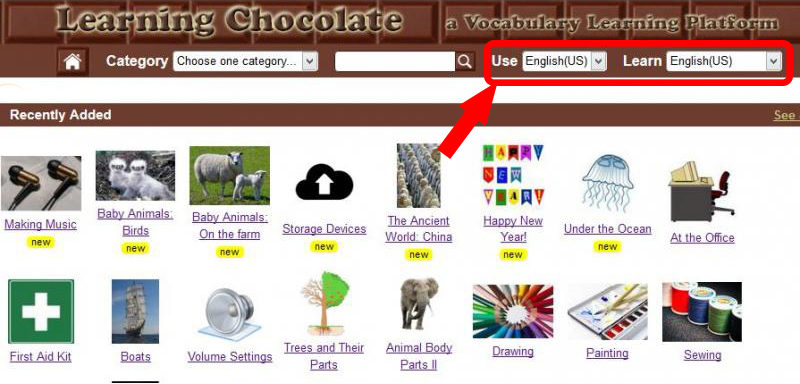
First, look for the language selection box at the top, right-hand corner of your screen.
(Fig. 1)
Choose the display language – your native language - and then the language you want to learn. Use the drop down menu to make your selection.

(Fig. 2)
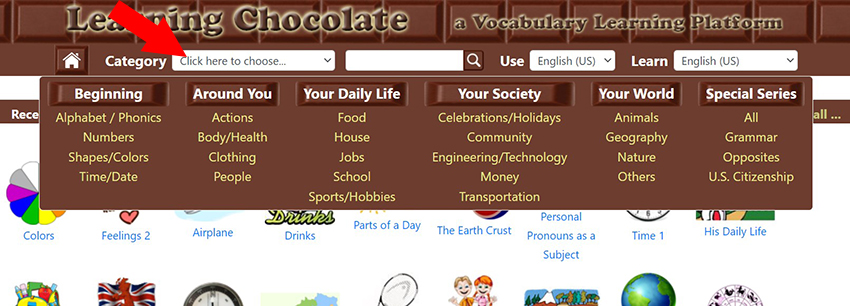
Then choose one category of vocabulary words you want to learn. You can either:
1. Click on the arrow next to ‘Click here to choose...’ to reveal a drop down sub-menu of all the categories.
(Fig. 3)
2. Or you can browse the 3 search blocks on our homepage which include every word set on the site:
RECENTLTY ADDED > All the newest word sets for that category will be listed first.

(Fig. 4)
USER FAVORITES > This allows you to see what word sets other users are enjoying.

(Fig. 5)
MOST VIEWED THIS MONTH > Check out the most popular word sets each month.

(Fig. 6)
Click any of the word sets to start learning!

(Fig. 7)
The first screen you will see is the “Review” page.

(Fig. 8)
This “Review” is designed to introduce you to new vocabulary; see a picture, read the word, and click the sound icon to hear the word aloud. Close your eyes and listen to the pronunciation and think about the picture. Pay careful attention as you explore all of the new vocabulary.

(Fig. 9)
After reviewing all of the words, you have a choice of 5 interactive games that are designed to help test and strengthen your memory.

(Fig. 10)
If you want to know how to play the games, click “?” You will see instructions on how to play each game.

(Fig. 11)

(Fig. 12)
After reading the instructions, click the “Back” button to resume the game.

(Fig. 13)
You can also use the ‘back arrow’ to return to the “Review” page at any time when playing, or after, a game.
If your browser supports a full-screen feature, you also have the option of clicking on the full screen button to view your chosen word set.

(Fig. 14)
When you have completed a game, click CHECK ANSWERS. You will see a ‘√’ for each correct answer and an ‘x’ for each incorrect answer. Your overall game score, based on your correct answers AND time taken to answer, will also be shown in the top right corner of the screen. Use your scores to check your progress and see how much better you do each time you play. Enjoy!
FAQ
Q: Do I need to pay to learn and play word sets on learningchocolate.com?
A: No, our word sets are totally free! You don’t need to pay.
Q: Do I need to register to play the word sets?
A: No, you don’t need to register. Only users who want to contribute word sets need to register.
Q: What is the difference between the USE language and the LEARN language options?
A: At the top of the right hand screen there are 2 boxes for you to set your language choice. The USE box should be set to your own native language, or the language you want to have the instructions and headings displayed in. For example, if you click on Spanish, the category headings will appear in Spanish. The LEARN box is the language you wish to learn by using the word sets.
Q: Why are there 2 English options - English (U.S) and English (U.K) - in the language option boxes?
A: This is one of the great features on LC! Depending on where you live and what you want to learn, you can play the word sets that suit you. U.S. and U.K. English are very similar, but there are a few differences both in terms of vocabulary (for example, a car trunk in the U.S. is a car boot in the U.K.!) and pronunciation. By offering both languages, you really get to be as proficient as a native speaker!